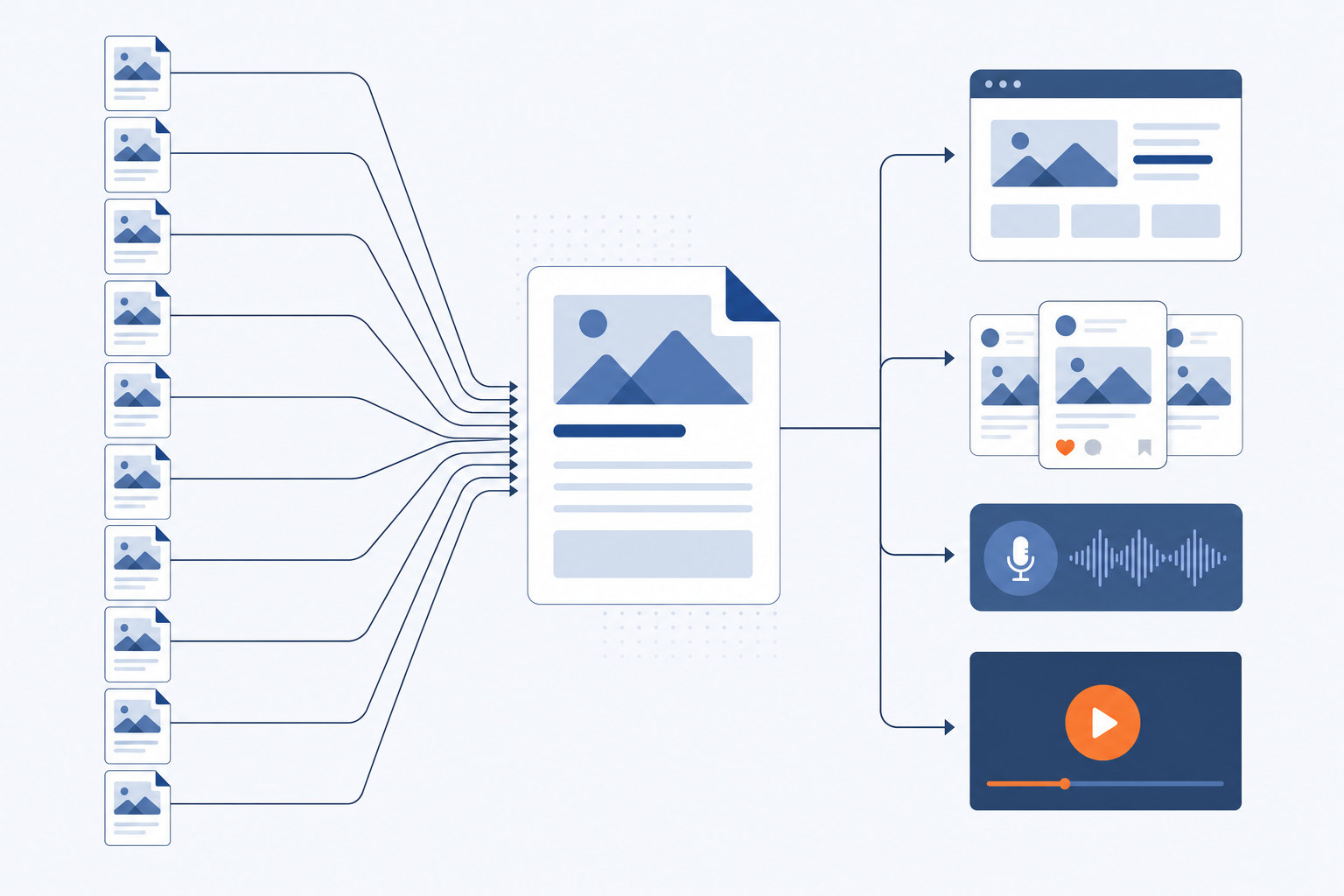
Short answer: ChatGPT or Claude, for most blogs. At about $20 a month each, the general models write as well as the dedicated writers that cost more, because most of those writers run on the same underlying models. The best AI for blog writing is therefore less about prose quality and more about how much of the weekly job a tool removes: research, images, publishing, and everything after the draft. Below: ten tools, ordered by scope, with published prices, an honest drawback for each, and a comparison table.
On this page
- What "best" means when the job is a blog post
- How we compared these, and what we could not test
- The ten tools, ordered by how much of the job they cover
- Comparison table: price, scope, best for
- ChatGPT vs specialised AI writers: which should you choose?
- Is AI-written content actually good for SEO?
- Which tool fits which kind of blogger
- The part none of them solve: what happens after the draft
- Key takeaways
- People also ask
What "best" means when the job is a blog post
A blog post is not a block of text. It is a keyword worth targeting, a structure that answers the question, facts that hold up, images, a published page on your own domain, and then the promotion that gets anyone to read it.
Most tools on this page do one slice of that: they turn a prompt into words. That slice matters. It is also the fastest part of the job.
So we judge on four things. Output quality on long-form, the published price, how much of the surrounding work the tool covers, and what it honestly is not for. Nothing here is scored out of ten. Model quality at the top of the market is close, and it changes every few months.
How we compared these, and what we could not test
What we compared: published pricing, the scope of the job each product covers, and the shape of the output each one is built to produce. Prices come from vendor pages and third-party pricing trackers, and they are listed as ranges where sources disagree.
What we could not test: output quality under controlled conditions. We did not run a blind benchmark across ten accounts, and any article that claims it did should show you the scoring sheet. Pricing also moves. Two of the tools below changed tiers during the last year, so treat every number as a starting point and check the vendor before you buy.
Our bias, stated once: we build the tenth item on this list. It sits last because it solves a later problem than the other nine, not because it writes better sentences. We say plainly what it is not for.
Ordering basis: scope, from "gives you a draft" to "runs the whole week". Not a quality ranking.
The ten tools, ordered by how much of the job they cover
1. ChatGPT: the default, and still hard to beat on value
Price: free tier, with the main paid plan published at about $20 a month.
It drafts, outlines, rewrites, and edits. Give it a detailed brief with your own facts and it produces a usable structure in minutes. Give it a one-line prompt and it produces the generic article everyone complains about on Reddit.
Drawback: it is a blank page with a cursor. No keyword data tied to what you can actually rank for, no images in your post, no publishing. Everything after "copy" is manual.
Best for: anyone who wants one subscription that covers drafting plus every other writing task in the business.
2. Claude: the better long-form writer for most people
Price: free tier, paid plan published at about $20 a month.
Claude holds a voice across 2,000 words better than most alternatives, and it follows a long brief without collapsing into listicle mush. It is also the better editor of the two general models: paste a draft, ask for cuts, and it cuts.
Drawback: usage limits bite during long sessions on the cheaper tier, and it has no SEO or publishing layer at all. Same gap as ChatGPT.
Best for: writers who care about how the sentences read and will still do the editing pass themselves.
3. Rytr: the cheapest dedicated writer
Price: a free plan capped around 10,000 characters a month, an unlimited plan reported between $7.50 and $9 a month, and a premium tier around $24 a month on annual billing, according to Stacklighthouse's breakdown of Rytr's plans.
Forty-plus use case templates, tone options, and a workflow built for short blocks of copy. For product descriptions and intros it is genuinely cheap.
Drawback: long articles come out in pieces you have to stitch, and the output needs more editing than the top models. Price is the reason to choose it, not quality.
Best for: a solo blogger testing whether AI drafting helps at all, on the smallest possible spend.
4. Grammarly: not a writer, an editing layer

Price: free tier, with the main paid plan commonly published around $12 a month on annual billing and roughly $30 month to month.
Grammarly now markets an AI blog writing tool, but its real value is the layer that follows you into whatever editor you already use. Grammar, tone, consistency, and trimming. The pass that makes an AI draft sound less like an AI draft.
Drawback: as a generator it is thin next to the models above. It has no research step and no long-form planning.
Best for: the clean-up stage, alongside one of the first three tools rather than instead of them.
5. Copy.ai: workflows first, blogging second

Price: entry plan reported around $29 a month, with team and enterprise tiers that climb steeply. Reports disagree on whether a permanent free tier still exists, so check before you plan around it.
Copy.ai has shifted toward go-to-market workflows: sales copy, outbound, repeatable chains of prompts. Blogging is still in there, with templates and a brand voice setting.
Drawback: blogging is no longer the centre of the product, and the gap between the entry plan and the team plans is large. Pricing clarity is poor compared with the $20 chatbots.
Best for: small teams automating a lot of sales and marketing text, with blog posts as one output among many.
6. Jasper: brand voice controls for marketing teams

Price: the Creator tier is listed around $49 a seat monthly and about $39 a seat on annual billing, with Pro quoted higher per seat, according to Vendr's Jasper pricing breakdown. Business pricing is custom.
Jasper's case is brand voice, knowledge assets, campaign templates, and collaboration for several writers. If five people need to produce copy that sounds like one company, the controls are real.
Drawback: it is several times the price of the general models it sits on top of, per seat, and you still edit the output. For one person writing one post a week, that maths rarely works.
Best for: marketing teams with a brand guide and more than one writer.
7. Writesonic: drafting plus visibility in AI answers

Price: individual plans reported from roughly $20 a month, with the AI search visibility tiers reported from about $79 a month billed yearly.
Writesonic bundles article generation with tracking of where your brand gets mentioned inside AI answer engines. That second part is the interesting half in 2026, as more research starts and ends inside a chatbot.
Drawback: the product has changed shape and pricing repeatedly, and the feature list is wide rather than deep. Verify what the current tier actually includes.
Best for: people who want AI answer visibility tracked alongside classic blog output.
8. Surfer SEO: drafts written against SERP data
Price: the Essential plan is listed at $99 a month, with cheaper and more expensive tiers reported depending on billing and plan mix. ZoftwareHub lists Essential at $99 per month.
Surfer scores a draft against the pages already ranking and tells you what the top results cover that you do not. Its AI writer produces a first draft already aimed at that outline.
Drawback: expensive for a solo blog, and a high content score is not the same as a page worth reading. Writing to the score produces articles that look exactly like the competition.
Best for: SEO-led teams publishing several posts a month who already work from keyword data.
9. HubSpot AI: free drafting, tied to the HubSpot stack

Price: the blog writer tool is free with an account. The paid Content Hub tiers it belongs to run into the hundreds of dollars a month.
The appeal is that the draft lands inside a CMS you already publish from, with your CRM next to it. For an existing HubSpot customer that is one less copy and paste.
Drawback: the free tool produces short, generic output that needs a full rewrite. Outside the HubSpot ecosystem there is little reason to choose it.
Best for: teams already paying for HubSpot.
10. Postiplex: the week, not the draft
Price: published on the plans page. Setup is a one-time connection of your website and your channels.
We built Postiplex because the nine tools above stop at the draft. Every week it researches a keyword that can realistically rank for your site, builds a blueprint and a section plan, writes and fact checks the article, illustrates it, publishes it to your blog, then repurposes it to every connected social channel at staggered times, records a two-host podcast episode on your own show, and turns that into a YouTube video.
Drawback, stated plainly: it is not a chat box. You cannot sit down and prompt it for a draft at 11pm, and you do not approve every sentence unless you choose to review. If controlling each paragraph is the point for you, one of the first three tools is the better buy. If no keyword clears the bar in a given week, the week stays empty. Nothing weak is planted to fill it.
Best for: an owner with no content team who wants output to happen without them.
Comparison table: price, scope, best for
Published prices as of this writing, monthly billing where both options exist. Scope means how much of the blog job the tool covers without you opening another tab.
| Tool | Published price | Scope | Best for | Watch out for |
|---|---|---|---|---|
| ChatGPT | Free, paid about $20/mo | Draft, edit | Everyone's default | Generic without a detailed brief |
| Claude | Free, paid about $20/mo | Draft, edit, long-form | Prose quality | Usage limits on long sessions |
| Rytr | Free, about $7.50 to $24/mo | Short-form draft | Smallest budget | Weak on full-length articles |
| Grammarly | Free, about $12/mo annual | Edit, polish | The clean-up pass | Not a real long-form generator |
| Copy.ai | From about $29/mo | Draft, workflows | Sales and marketing copy | Blogging no longer the focus |
| Jasper | About $39 to $49/seat/mo | Draft, brand voice, teams | Multi-writer teams | Per-seat cost over a $20 chatbot |
| Writesonic | About $20 to $79/mo | Draft, AI search visibility | Answer-engine tracking | Frequent product and price changes |
| Surfer SEO | Essential about $99/mo | Draft, on-page optimisation | SEO-led teams | Score chasing produces lookalike posts |
| HubSpot AI | Free tool, paid tiers much higher | Draft, publish in HubSpot | Existing HubSpot users | Thin output outside the stack |
| Postiplex | See plans page | Research, write, publish, social, podcast, video | No content team at all | Not a prompt-on-demand writer |
ChatGPT vs specialised AI writers: which should you choose?
Start with ChatGPT or Claude. Only move to a specialised writer when you can name the feature you are buying.
The reason is simple. Jasper, Copy.ai, Writesonic and most of the rest call the same families of large language models you reach directly for $20. What you pay extra for is the wrapper: brand voice storage, templates, SERP data, team seats, workflows. That wrapper is worth money in exactly three cases.
- More than one writer. Shared brand voice and shared assets stop five people producing five tones. Jasper earns its seat price here.
- You work from keyword data. If every post starts from a SERP analysis, Surfer saves the manual comparison you would otherwise do by hand.
- You publish inside one platform. HubSpot's writer saves steps only because the draft lands where the site already lives.
If none of the three describes you, the specialised tool mostly adds a template menu over output you can get for less. One honest test before you buy: write your next post with the $20 model, using a brief that contains your own prices, your own customer questions, and your own examples. If the result still needs a heavy rewrite, a $49 tool will not fix that, because the weakness was in the brief, not the model.
Is AI-written content actually good for SEO?
AI content can rank. Unedited AI content usually does not, and the reason is not the robot, it is the sameness.
Google's own position is that it rewards high quality content however it is produced, and that its spam policies target scaled content abuse, meaning pages mass-produced mainly to manipulate rankings rather than to help anyone. That guidance is published in Google Search Central's statement on AI-generated content. Production method is not the line. Usefulness is.
The practical problem is that a thin prompt produces the average of everything already written on the topic. Ten competitors prompt the same model about the same keyword and publish ten versions of the same page. None of them adds a fact the others lack, so none of them earns the position.
What changes the result, in the articles we see perform: a real number the reader cannot get elsewhere, a named source behind every claim, a stated recommendation per situation, and the honest limits of the thing being described. The forum sceptics are right about the default output. They are wrong that the problem is unfixable. It is fixed at the brief and the research stage, before the model writes a word.
Expect to edit. Budget 30 to 60 minutes per post for fact checking and adding your own specifics, whichever tool you pick.
Which tool fits which kind of blogger
Recommendations by situation, with the reason.
- Solo blogger, first tool, smallest spend: the free tier of ChatGPT or Claude. Only pay once you hit the limits. Rytr if you want a dedicated writer under $10.
- Marketer comparing free ChatGPT with paid tools: stay on the $20 plan unless you need brand voice across several writers. Then Jasper.
- SEO content manager: Surfer for the data layer, paired with Claude for the drafting, because the Surfer draft alone reads like the competition.
- HubSpot customer: use the built-in writer for speed, rewrite the output before publishing.
- Owner with no content team and no time: a writer is the wrong purchase. You need the publishing and distribution steps handled too, which is the next section.
The part none of them solve: what happens after the draft
Every tool above hands you a document. The document is not the job.
Count what remains after the draft exists: choose the keyword before writing and check whether you can realistically rank for it, fact check the claims, source or generate images, format and publish to your CMS, write and schedule the social posts for each channel, and keep that running every week for months. In our experience, drafting is the smallest block of time in that list. The weekly repeat is what kills most small business blogs, not the writing.
That gap is why we built a pipeline instead of another writer. Connect the site and the channels once, and each week runs on its own: keyword, blueprint, article, images, publish, then the repurposing to every connected channel at staggered posting times, a two-host episode on your own show, and a video from it. If a publish fails, it retries three times. The full week, step by step is documented, and our reasoning for building it this way is written up separately.
This is not a replacement for ChatGPT. Keep the chatbot for emails, ideas and one-off edits. The question is only whether you want to run the weekly pipeline yourself or not.
Connect your website and your channels. See the plans, then watch one real week land on your own site.
Key takeaways
- For most people the $20 general models, ChatGPT and Claude, match or beat dedicated writers on output, because the writers run on the same models.
- Pay more only for a named feature: brand voice across writers, SERP data, team seats, or publishing inside your existing platform.
- Rytr is the cheapest dedicated option. Grammarly is an editing layer, not a generator. Surfer is for teams with keyword workflows.
- Google rewards helpful content regardless of how it was produced, and targets mass-produced pages made to manipulate rankings.
- Budget 30 to 60 minutes of editing per post. Specifics, sources and a clear recommendation are what separate a ranking page from the average draft.
- Choosing a writer solves drafting only. Research, publishing and distribution stay manual unless something runs them for you.
People also ask
Can I use ChatGPT to write a blog?
Yes. It will produce a complete, publishable-looking post from a detailed brief in a few minutes. It will not pick the keyword, check the facts, add images, or publish the page, and output from a one-line prompt reads like everyone else's. Give it your prices, your customer questions and your examples, then edit.
What is the best free AI for blog writing?
The free tiers of ChatGPT and Claude, in that order for availability and the reverse order for long-form prose. Rytr's free plan allows roughly 10,000 characters a month, about 1,500 words, which is one short post. HubSpot's blog writer is free with an account but produces short, generic drafts.
Which AI is better than ChatGPT for writing?
Claude is the common answer among working writers for long-form drafting and editing, at the same published price of about $20 a month. For optimisation against search results rather than prose, Surfer does something ChatGPT does not. Neither replaces ChatGPT across general tasks.
Is ChatGPT still the best AI?
It is still the best default, not the best at everything. It has the widest feature set and the largest free tier, while Claude tends to win on long-form writing quality and Gemini-class models win on live search context. The gap between the top models is small enough that your brief matters more than your choice.
What do people on Reddit say about AI blog writing tools?
The recurring complaint is that output is generic and needs heavy editing, and that paid wrappers add little over the raw model. That criticism is fair for default output. It stops applying when the brief carries original facts, which is work no tool does for you unless it researches first.
Which AI blog writer is best for a beginner?
Start free with ChatGPT or Claude and write three posts before paying anything. You will learn whether your bottleneck is drafting, which a writer fixes, or the weekly publishing and promotion, which it does not. Spend money only once you know which one it is.